A clearer way to manage money, together.

Track spending, plan the month, and share only the wallets you choose. No bank login required.

Coming soon to the App Store See how Monly works

Free to download. Optional Pro upgrade.

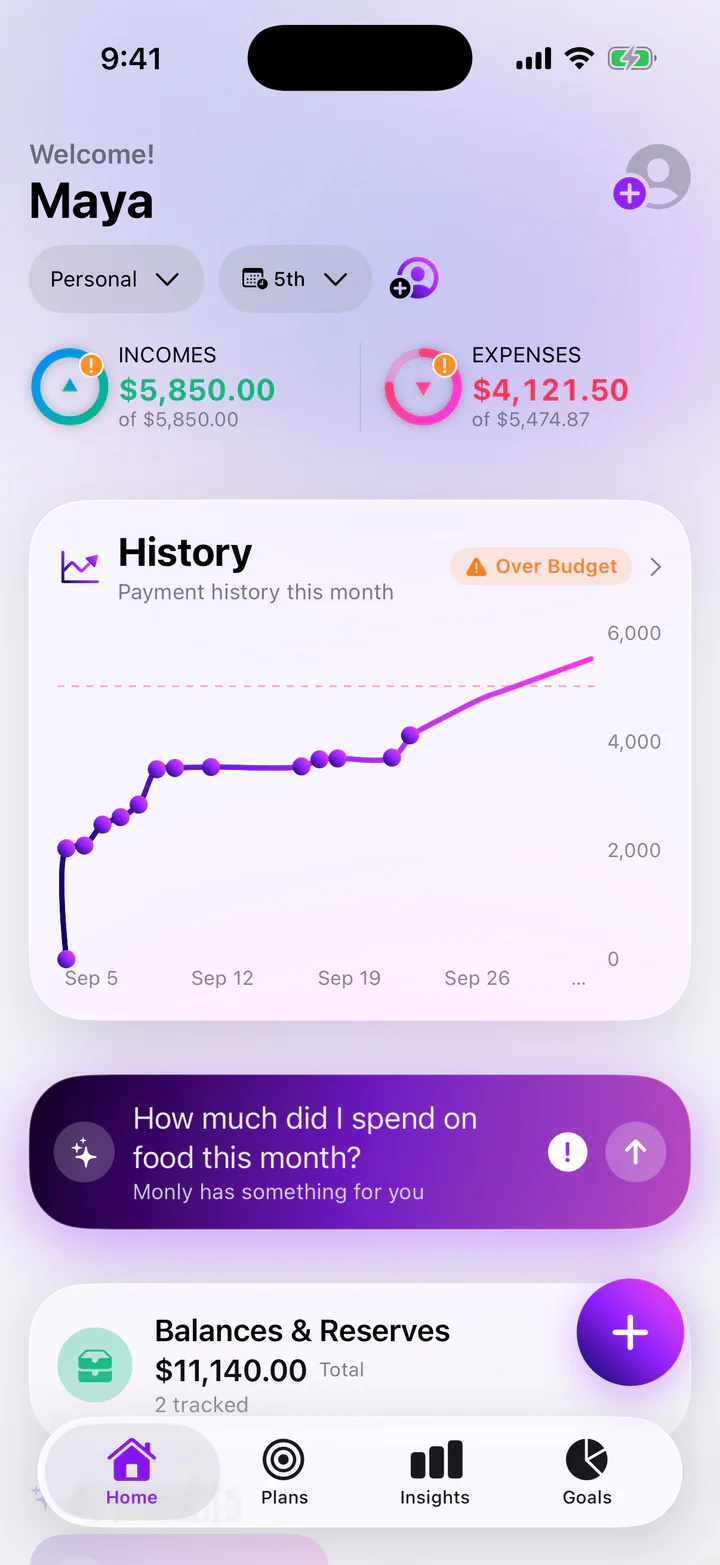
Monly Home screen for a fictional user, Maya: this month’s incomes of $5,850.00, expenses of $4,121.50 of a planned $5,474.87, and a payment history chart flagged Over Budget.
Animated scene: the Monly Home screen floats in 3D with slices of real Monly screens around it: an upcoming bill, this month’s cash flow, a coffee budget and the people sharing the wallet. Screens show a fictional demo account.
Skip animation

Home

Your month, understood.

Monly opens on what decides your month: what came in, what went out, what’s due next and how every budget is doing.

Monly Home screen: the wallet “Personal” with a month that starts on the 5th; incomes of $5,850.00 of $5,850.00 and expenses of $4,121.50 of $5,474.87; and a History chart of this month’s payments flagged Over Budget.
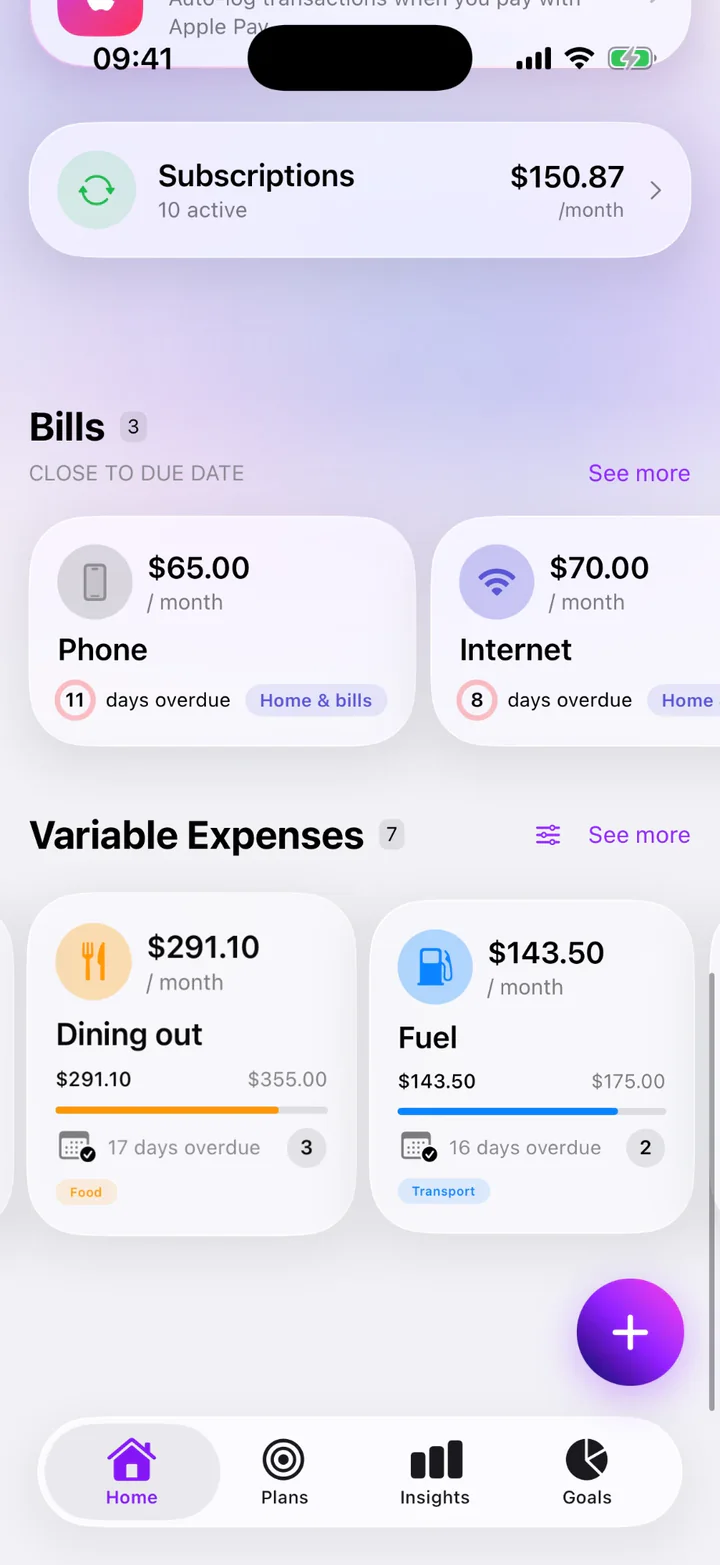
Monly Home, scrolled down: Subscriptions, 10 active, $150.87 a month; Bills close to due date, with Phone $65.00, 11 days overdue, and Internet $70.00, 8 days overdue; and Variable Expenses, with Dining out $291.10 of $355.00 and Fuel $143.50 of $175.00.

Shared wallets

One wallet. Everyone in sync.

Share one wallet with a partner, your family or housemates. Everyone works from the same expenses, budgets and bills, and your other wallets stay private.

Monly’s Home screen for the shared wallet “Personal”.
Monly Members screen for the shared wallet “Personal”: 3 of 6 people, Maya (you, Owner), Daniel (Editor) and Emma (Viewer), an Invite someone button, and the note “If sharing ends, everyone keeps their own copy of the data.”
  1. Every invite is a single-use link for one person, and it expires after a week.

  2. It’s saved on his phone first and sent right away when he’s online, or the next time he opens Monly with a connection.

  3. Shared wallets catch up whenever someone opens the app, so everyone works from the same expenses, budgets and bills.

Roles that match real life
The Owner manages members and every part of the wallet. Editors add and edit expenses, budgets and bills. Viewers see everything but can’t change the shared wallet. People join as Editors, and the owner can change anyone’s role.
Up to six people
A couple, a family, a flat of housemates: each shared wallet holds up to six members, including you.
Works offline
Add and edit expenses without a connection. Your changes are sent the next time you open Monly online. Sharing, invites and joining need a connection.
Everyone keeps a copy
If sharing ends, each member keeps their own copy of the wallet on their phone. Balances, reserves and plans always stay on each person’s own phone.

Sharing your own wallet is part of Monly Pro. The people you invite join for free, with Sign in with Apple.

Insights

See what changed, and why.

A financial health score, cash flow and where every dollar goes by category, worked out from the expenses, bills and budgets you already track.

One score, four pillars
Savings, budgets, subscriptions and bills each feed a single health score from 0 to 100.
Cash flow against last month
See what’s left after spending, and how it compares with the month before.
Where every dollar goes
Spending by category, a six-month trend and the biggest changes against last month.
Rules you can live by
Group categories into shares like Essentials 55% and Future me 20%, and watch the month track against them.
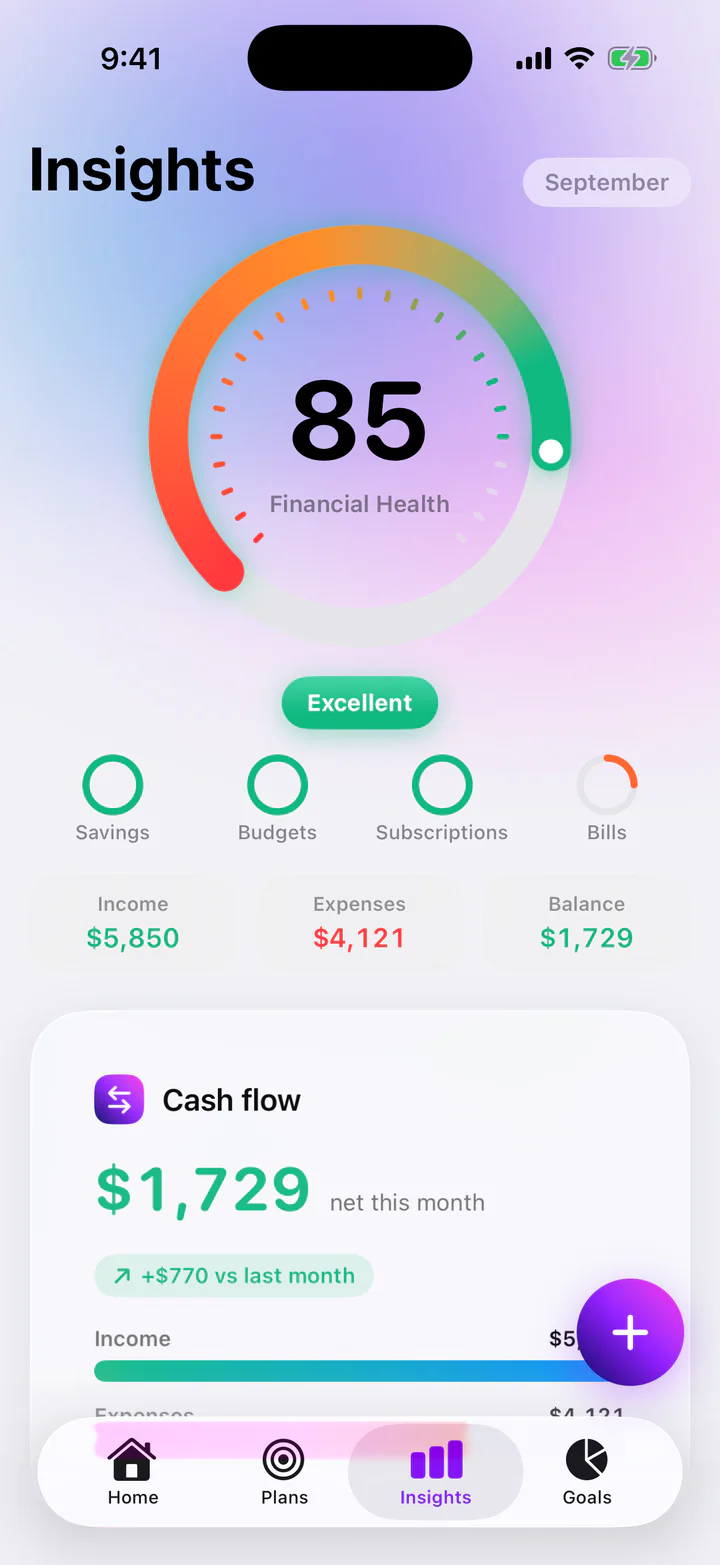
Monly Insights for September: a Financial Health score of 85, rated Excellent, with Savings, Budgets, Subscriptions and Bills pillars; income $5,850, expenses $4,121 and a balance of $1,729; and a cash flow card showing $1,729 net this month, $770 more than last month.

September at a glance

Financial Health
85/100Excellent
Income
$5,850
Expenses
$4,121
Net this month
$1,729+$770 vs last month

This month by category

Current expenses $4,718.49

Home & bills
56%
Food
19%
Transport
16%
Lifestyle
6%
Subscriptions
3%
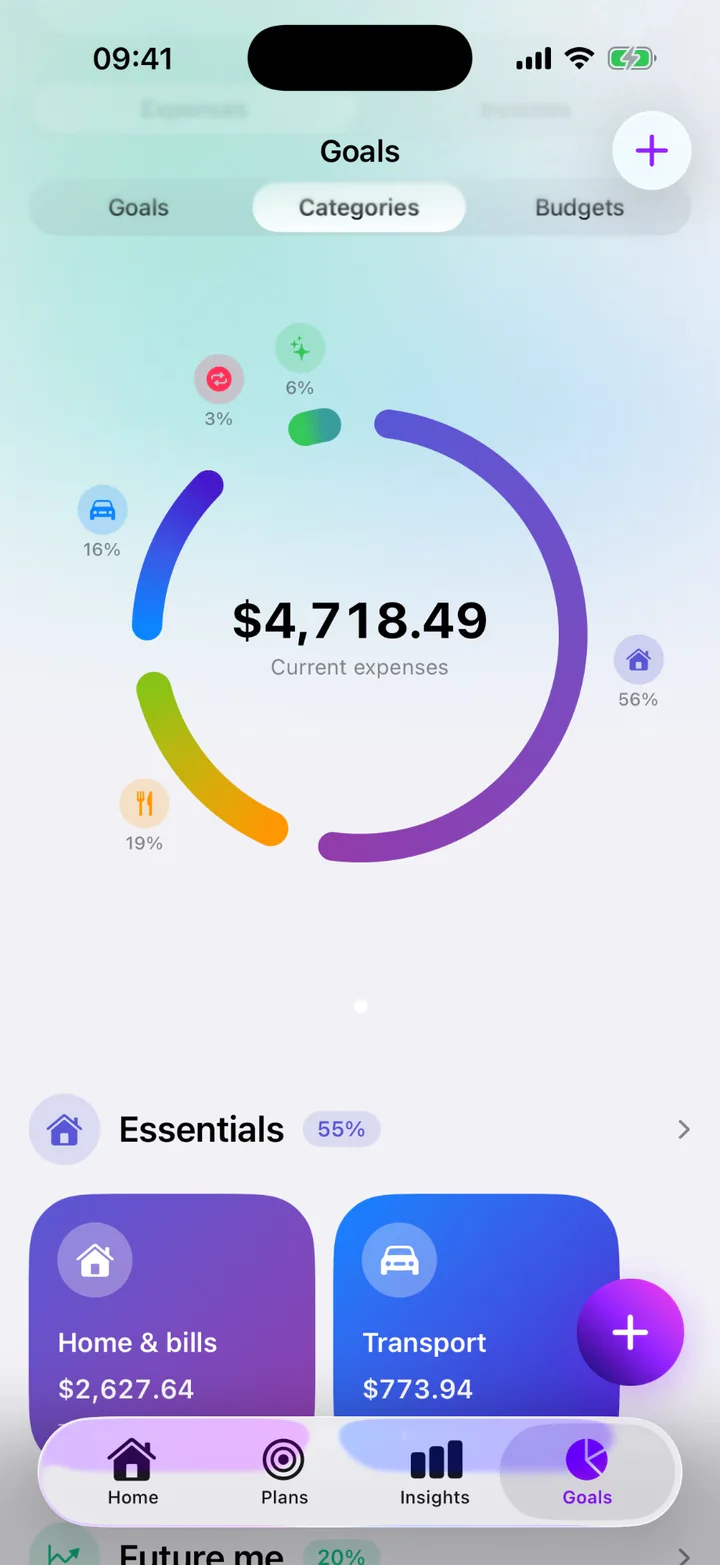
Monly Goals, Categories view: current expenses of $4,718.49 split by category (Home & bills 56%, Food 19%, Transport 16%, Lifestyle 6% and Subscriptions 3%) above the Essentials group at 55%, with Home & bills at $2,627.64 and Transport at $773.94.

The health score, cash flow, categories and spending trend are free. Monly Pro adds the full list of biggest changes.

Ask & plan

Say it once. Monly handles it.

Monly’s AI works from your own numbers. Tell it what happened or what you want changed, in plain words, and it does the bookkeeping. Clear, single entries are recorded right away with Undo; anything that reshapes several items waits for your OK.

Skip animation
  1. Set up

    Add a subscription in one line

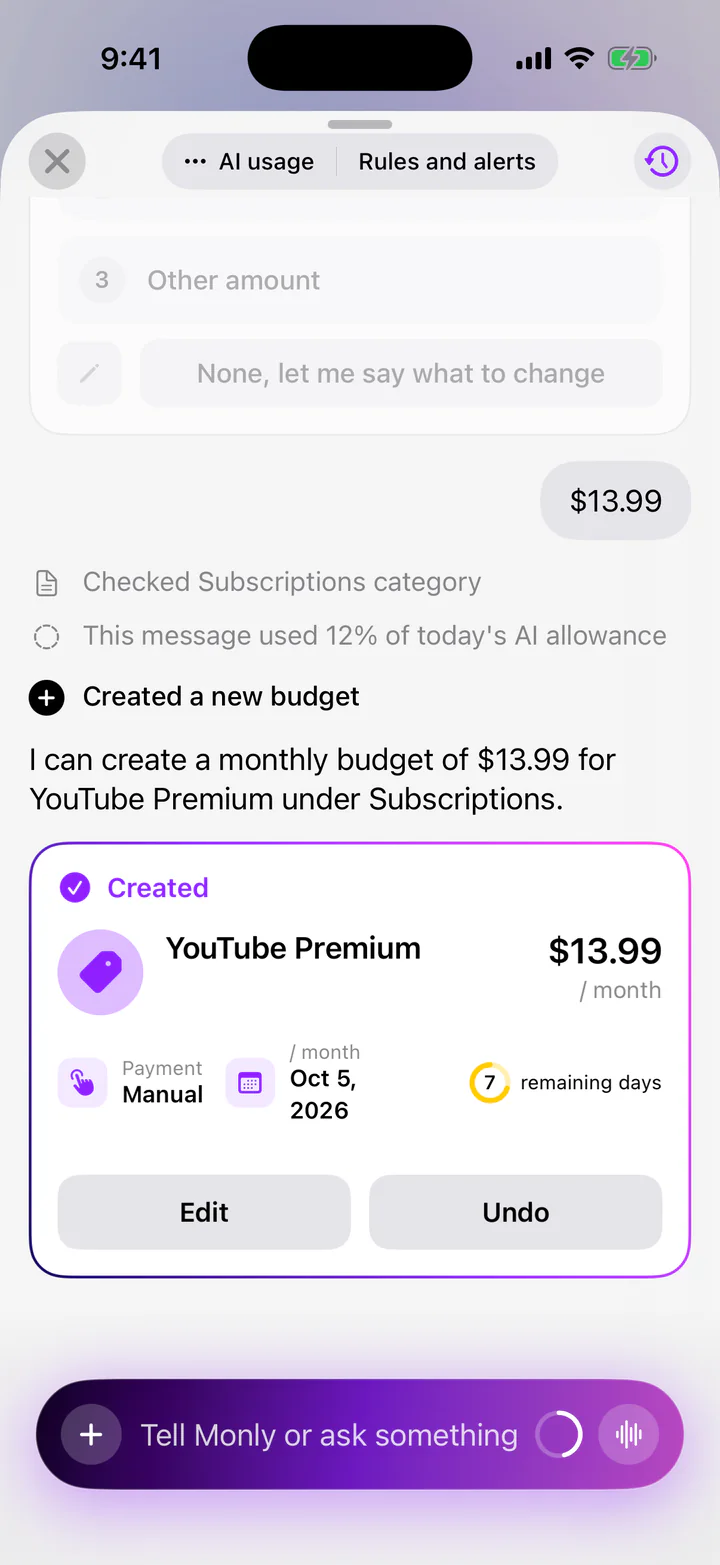
    Say “Add my YouTube Premium subscription”. Monly asks only what it can’t know (here, the price), then creates the monthly budget under Subscriptions, with its due date and the days left. Edit and Undo sit right on the card.

    Monly assistant after the reply “$13.99”: a “Created” card for YouTube Premium, $13.99 per month, payment Manual, due Oct 5, 2026, 7 days remaining, with Edit and Undo buttons.
  2. Log

    Log a purchase, see what’s left

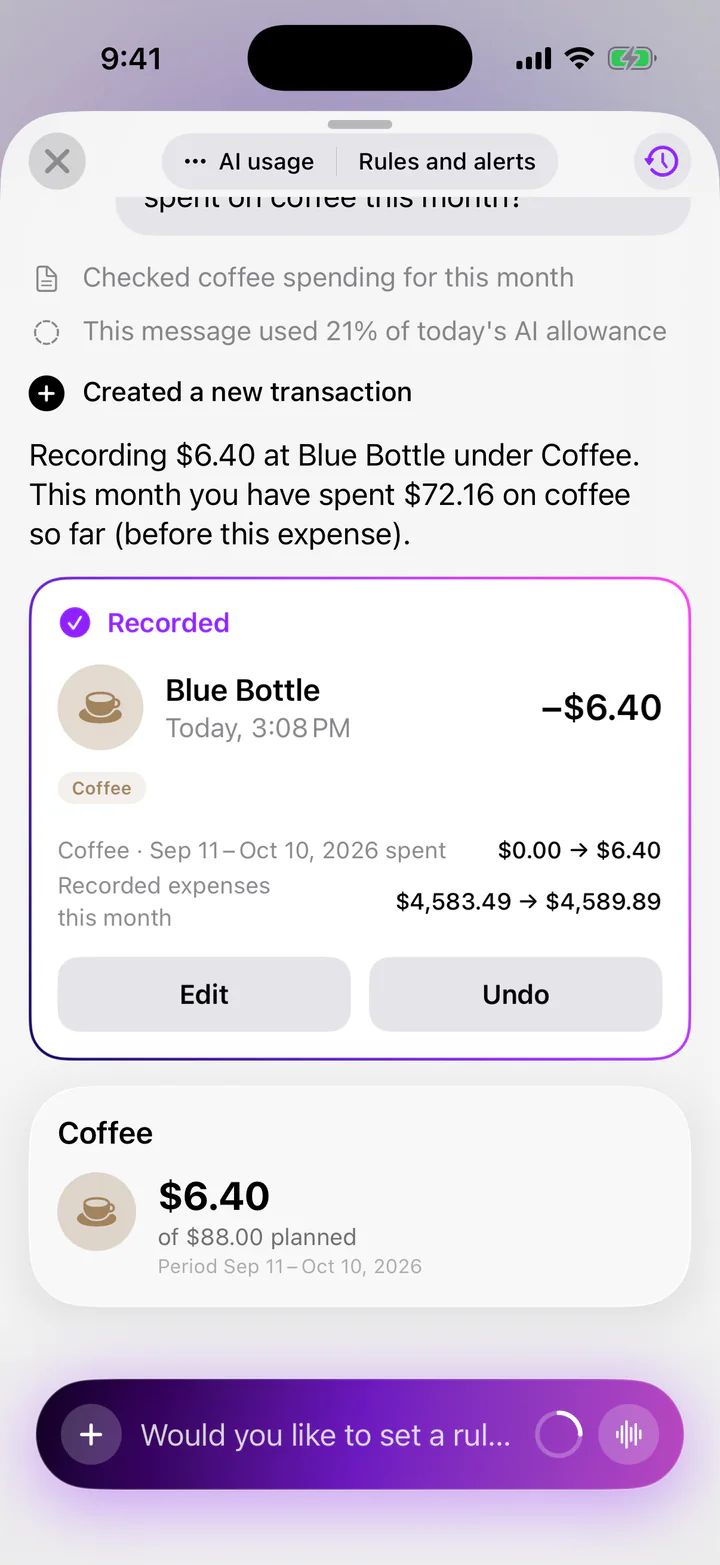
    Type “Just paid $6.40 at Blue Bottle” and it’s recorded straight away in the right budget, Coffee, with Undo, next to how much of that budget you’ve used. Snap a receipt or import a PDF and Monly lists what it found for you to review first. Pay with Apple Pay? An optional Shortcuts automation logs it for you.

    Monly assistant: a “Recorded” card for Blue Bottle, −$6.40 today at 8:58 PM, filed under Coffee; Coffee spending for Sep 11 to Oct 10 goes from $0.00 to $6.40, with Edit and Undo. Below, the Coffee budget: $6.40 of $88.00 planned.
  3. Change

    Several changes, one OK

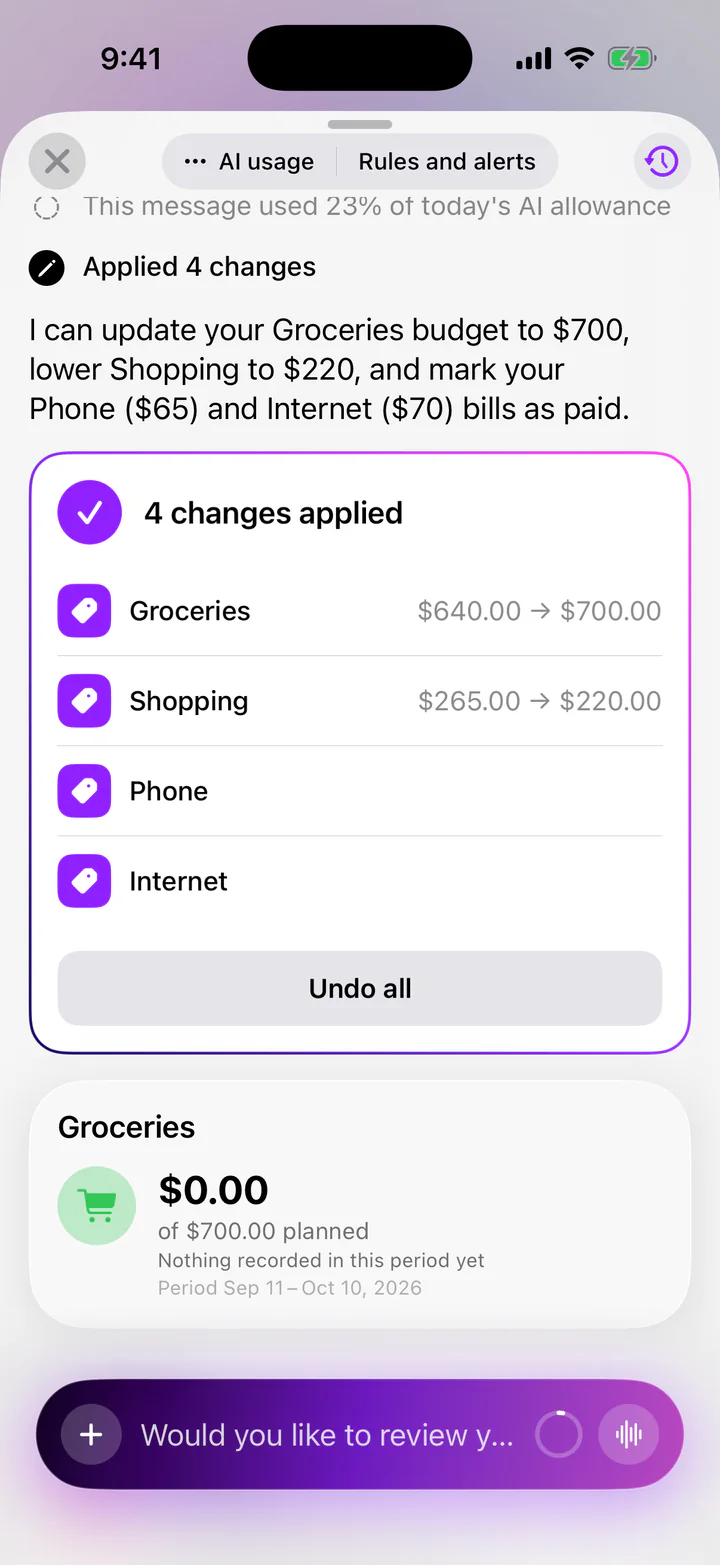
    Ask for a few things at once: “Raise Groceries to $700, lower Shopping to $220, and mark Phone and Internet as paid.” Monly proposes the whole set first, applies it when you tap Apply, and keeps a single Undo all.

    Monly assistant: “Applied 4 changes”: Groceries $640.00 → $700.00, Shopping $265.00 → $220.00, Phone and Internet, with an Undo all button. Below, the Groceries budget: $0.00 of $700.00 planned.

The assistant and receipt scanning are free within a daily and monthly AI allowance; Monly Pro makes it much larger. How your data is handled

AI answers, plans and receipt readings can be wrong or incomplete, so check them before relying on them. Monly is a budgeting tool, not financial advice.

Every week

The weekly routine, handled.

Budgets, bills, subscriptions and balances: the four things worth a weekly look, each one a glance.

Budgets that fill as you spend

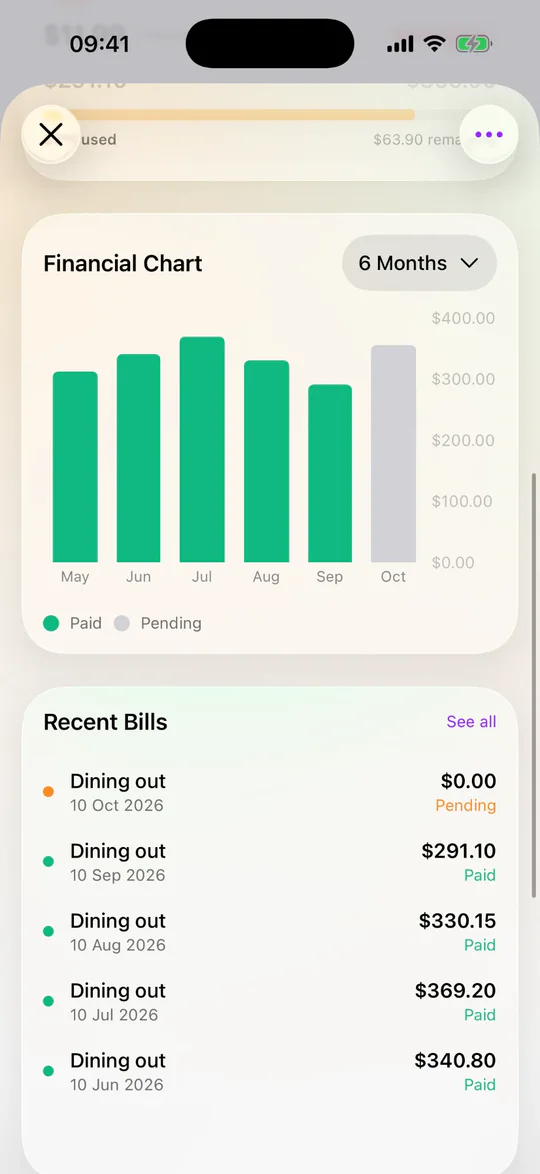
Set a limit for each expense and watch its bar fill as you spend. Open one to see its last six months: what you paid, and what’s still pending.
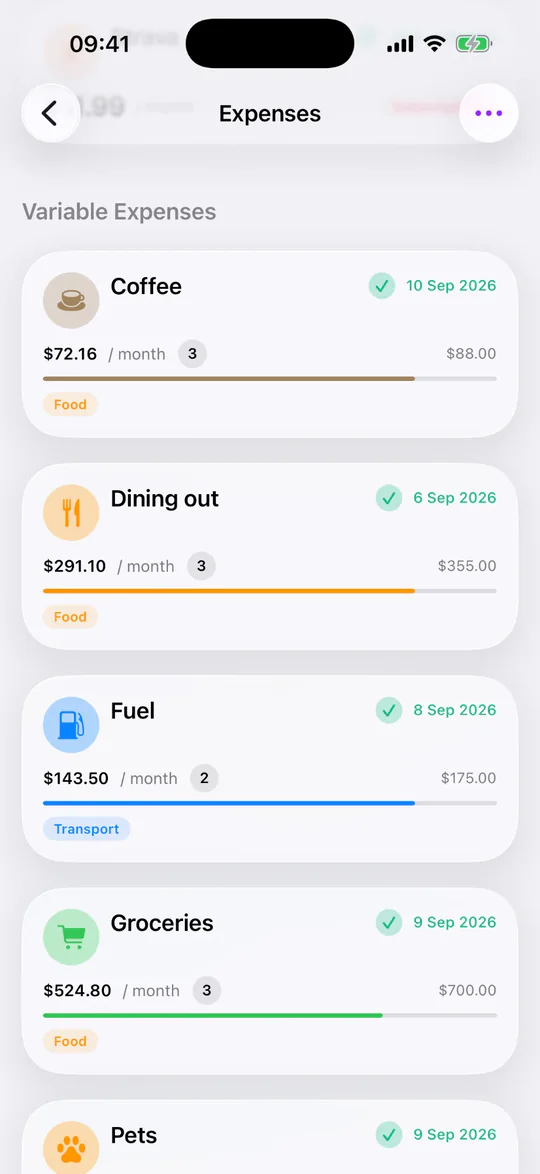
Monly Expenses list of variable budgets: Coffee $72.16 of $88.00, Dining out $291.10 of $355.00, Fuel $143.50 of $175.00 and Groceries $524.80 of $700.00, each with a progress bar and its category.
Monly Dining out budget detail: a Financial Chart of the last six months, May to October, with paid months in green and October pending, and Recent Bills: $291.10 in September, $330.15 in August, $369.20 in July and $340.80 in June.

Bills that say when

Every bill shows how many days are left (or how long it’s overdue) in words, not just color. Automatic bills mark themselves paid; manual ones wait for your OK.
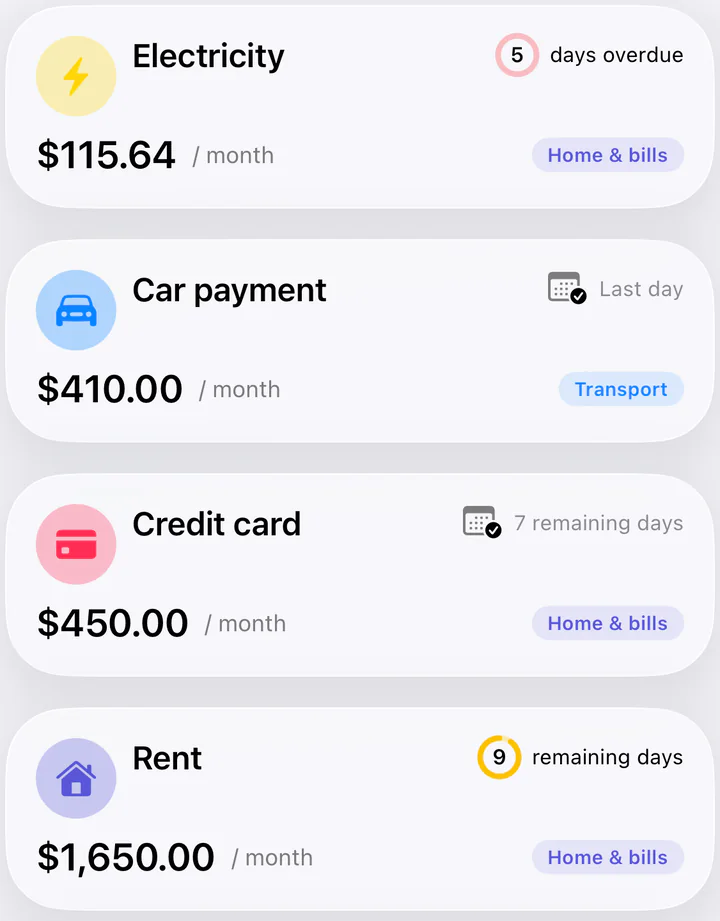
  • Overdue5 days overdue
  • Due soonLast day
  • Coming up7 remaining days
Monly Bills list: Electricity $115.64, 5 days overdue; Car payment $410.00, last day; Credit card $450.00, 7 remaining days; Rent $1,650.00, 9 remaining days.

Every subscription, by the month and by the year

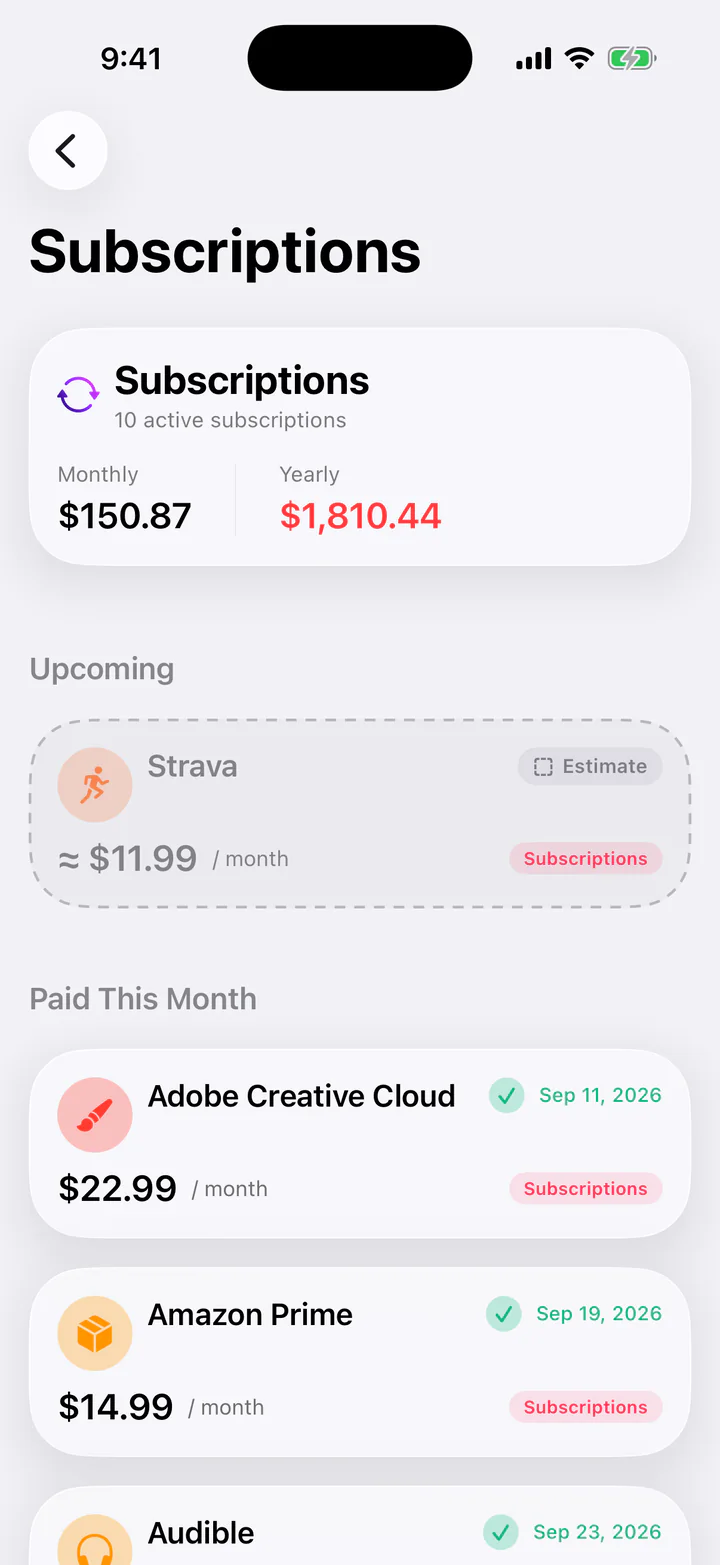
Mark a bill as a subscription and see every one in one list, with what they cost each month and what that adds up to over a year.

$150.87 a month

$1,810.44 a year

10 active subscriptions

Monly Subscriptions screen: 10 active subscriptions costing $150.87 a month and $1,810.44 a year, an upcoming Strava charge of about $11.99, and subscriptions already paid this month such as Adobe Creative Cloud and Amazon Prime.

Move money between your own balances

Log a movement from your main account to a reserve, once or every month. It’s bookkeeping you do by hand: Monly never moves real money and never connects to your bank.
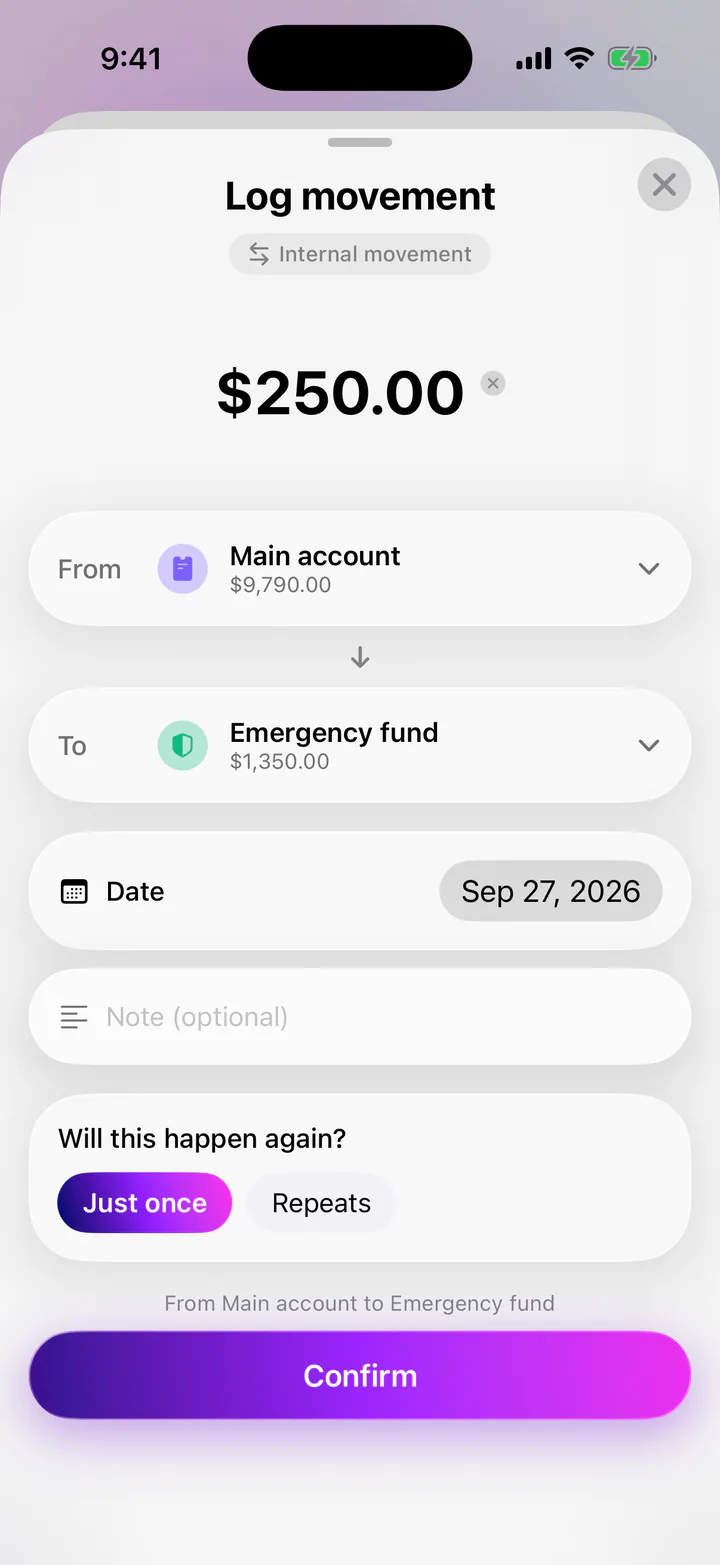
Monly Log movement sheet: an internal movement of $250.00 from Main account ($9,790.00) to Emergency fund ($1,350.00), dated Sep 27, 2026, set to happen just once, with a Confirm button.

Monly Pro

Go deeper when your money gets more complex.

Monly is free to use. Monly Pro is one optional subscription for more wallets, sharing, unlimited goals and a much bigger AI allowance.
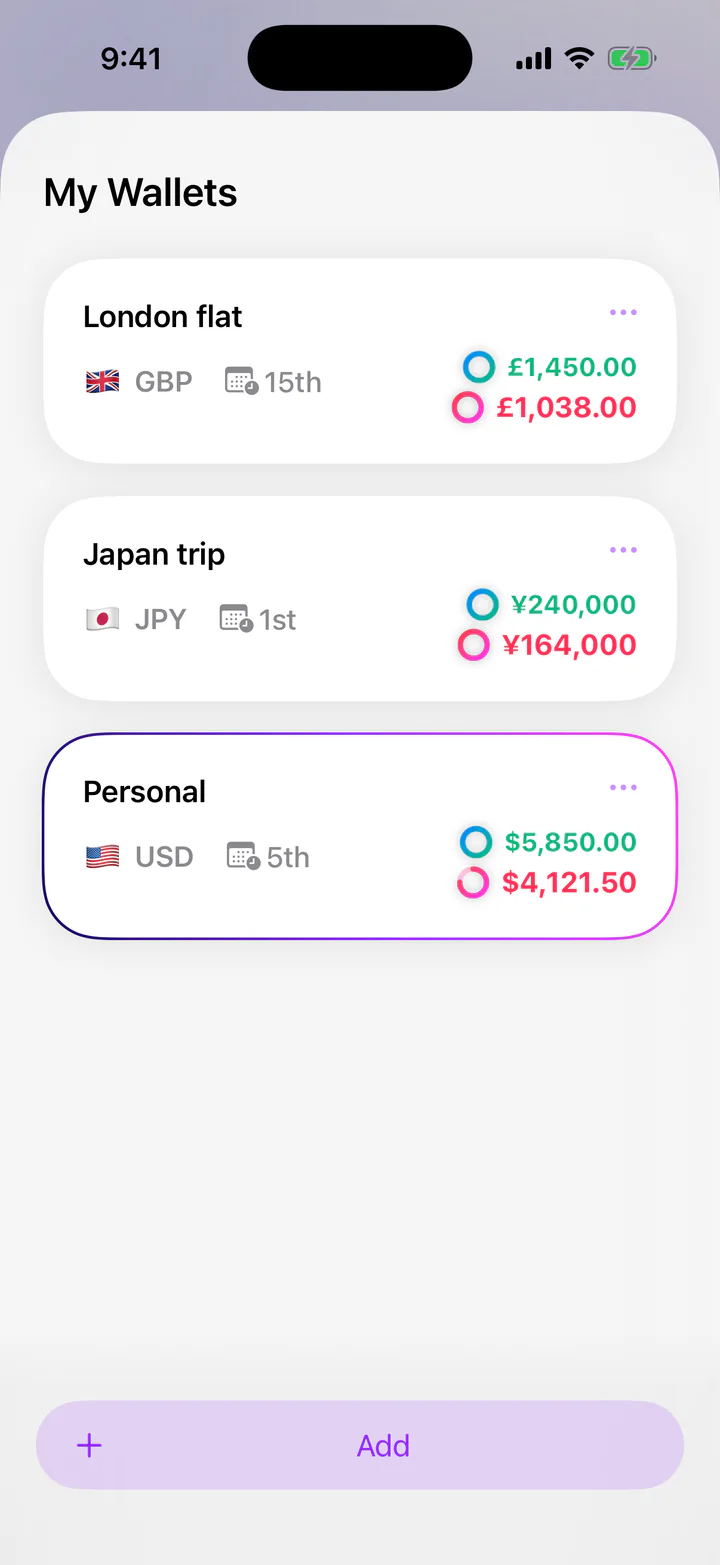
Monly My Wallets screen listing three wallets in their own currencies: London flat in pounds, Japan trip in yen and Personal in US dollars.
  1. Unlimited walletsHome, travel, a rental flat, each with its own budgets and currency, kept apart.
  2. Shared walletsPlan money with your partner or family. The people you invite join for free.
  3. Unlimited goalsEmergency fund, a trip, a paid-off card: track every goal side by side.
  4. AI plans and a plan coachMore plans, built around you, with guidance on what to do next.
Free vs Pro: What each plan includes
FeatureFreeMonly Pro
Wallets 1 Unlimited
Share your walletsJoining someone else’s wallet is free. Not included Included
Savings goals 1 per wallet Unlimited
Balances & cards Main + 1 reserve Unlimited + cards
AI plans Your first plan Unlimited plans + coach
Insights Overview Full list of changes
AI assistant A daily allowance Much larger allowance
Export & import Not included Included

Always free: budgets, bills, subscriptions, the health score, and receipt scanning and Ask within the daily and monthly AI allowance.

How billing works

  • Billed by Apple as an auto-renewing subscription. You choose a plan inside the app, where the price is shown in your currency before you pay.
  • Eligible new subscribers can start the yearly plan with a 3-day free trial; it then renews at the yearly price unless you cancel at least 24 hours before the trial ends.
  • Cancel any time in your Apple Account’s subscription settings. Cancelling never deletes anything you’ve created.
  • Monly Pro covers your own Apple Account; Family Sharing isn’t available. People you share a wallet with join for free.
Coming soon to the App StoreFree to download. Monly Pro is optional.

Privacy

Private by default. Shared by choice.

Your wallets are stored on your iPhone. Only a wallet you deliberately share is stored on our server, and only the people you invite can see it. AI features send data only when you use them.

Where your data goes. Wallets are stored on your iPhone. A wallet you choose to share syncs through Monly’s server to the people you invite, in the role you give them. When you use an AI feature, the data it needs goes through Monly’s AI gateway to Google’s Gemini API and is not stored on Monly’s servers.
  1. Your iPhone

    Your wallets, expenses and budgets are stored here. No account needed.

    Private wallets Never stored on our server.

  2. A wallet you share

    Only that wallet is stored on our server, so its members can sync.

  3. People you invite

    They see that one wallet, in the role you give them.

  4. AI features

    When you use an AI feature, what it needs is sent through our AI gateway to Google’s Gemini API to answer you. With Monly Pro, opening Insights or a plan runs its analysis automatically. Not kept on our servers.

No bank login. Ever.
Monly never connects to your bank and never asks for bank credentials.
Sign in with Apple, only to share
You sign in only to share a wallet or join one, and Apple lets you hide your email.
AI sends what the feature needs
Your message, a receipt photo, or a summary of the wallet you’re using (budgets, recent transactions, bills, balances, goals and plans). Never used to profile you or for ads.
No ad tracking
No ads, no advertising identifiers, no data selling. The app sends pseudonymous usage events; this website loads nothing from third parties.

Read the full privacy policy

FAQ

Questions, answered.

More answers on the support page

Is Monly free?

Yes. Monly is free to download and free to use, with a few limits: one wallet of your own, one savings goal per wallet, a main balance plus one reserve, and a daily and monthly AI allowance. Monly Pro is an optional subscription, billed by Apple, that removes the wallet, goal and reserve limits and gives you a much larger AI allowance. You see the exact price in the app before paying anything.

Which features require Monly Pro?

Sharing your own wallets, more than one wallet, unlimited goals, extra reserves and credit cards, new AI plans and the plan coach, the full list of biggest changes in Insights, the AI monthly review, export and import, and a much larger AI allowance. Budgets, bills, subscriptions, the health score, receipt scanning and Ask stay free.

Does Monly connect to my bank?

No. Monly never connects to your bank and never asks for bank credentials. You log expenses yourself, by typing, speaking or photographing a receipt, or automatically when you pay with Apple Pay, after a one-time Shortcuts setup. Balances are tracked by hand.

What happens when I share a wallet?

That wallet is stored on our server so the people you invite can sync it. You send each person a single-use invite link; they join for free with Sign in with Apple, as Editors, and you can switch anyone to Viewer. Changes are sent right after each edit and reach everyone else the next time they open Monly. Nothing else on your phone is shared: balances, reserves and plans stay on each person’s phone. Sharing your own wallet needs Monly Pro.

Can invited people see my other wallets?

No. Sharing is per wallet. An invitation gives access to that one wallet and nothing else.

What happens when sharing stops?

Everyone keeps their own copy as a private wallet, as it was when they last synced. Nothing is deleted from anyone’s phone; the wallet simply stops syncing. If you’d like its server copy deleted, email us.

Does Monly work offline?

Yes, for everyday use. You can add and edit expenses without a connection, in shared wallets too, and changes to a shared wallet are sent the next time you open Monly online. Sharing, joining, invites and AI features need a connection.

How does Monly’s AI use my data?

AI features are optional. When you use one (the assistant, receipt scanning, typed or spoken entries, plans and the plan coach, insights, monthly reviews, or Apple Pay categorisation), Monly sends what that feature needs through our AI gateway to Google’s Gemini API: for example your message, a receipt photo, or a summary of the wallet you’re using (budgets, recent transactions, bills, balances, goals and plans). With Monly Pro, opening Insights or a plan runs its analysis automatically. We don’t keep those requests or answers on our servers, and they’re never used to profile you or for ads.

How do I cancel or restore a subscription?

Monly Pro is managed by Apple: cancel any time in your Apple Account’s subscription settings, at least 24 hours before the period ends. To restore a purchase on a new device, open any Monly Pro feature and tap “Restore purchases” at the bottom of the Monly Pro screen, signed in with the same Apple Account.

How do I export or delete my data?

“Export All Data”, in your profile under Data Management, saves a backup file and is part of Monly Pro. Private wallets are stored only on your phone, so deleting the app deletes them. To delete your Sign in with Apple account and any shared-wallet data from our server, email us.

Make this month make sense.

Budget on your own, or with the people you share money with.

Coming soon to the App Store

For iPhone · Requires iOS 18.6 or later · Free to download, with optional Monly Pro

Monly Home screen for the fictional user Maya at the end of the demo month.